
You’re busy running a business. Between managing crews and keeping customers happy, the last thing you need is a headache from your Meta Business Suite. So when an email pops up saying you’ve received a “partner request” to share business assets, your first instinct might be to click “View Request” and get it off your plate.
Stop right there.
There is a sophisticated phishing scam making the rounds in Topeka, Lawrence, and Manhattan right now, and it’s catching even savvy business owners off guard. At SEM By Design, our motto is Foundation First, and a big part of that foundation is keeping your digital assets under lock and key.
The Anatomy of the “Partner Credit” Scam
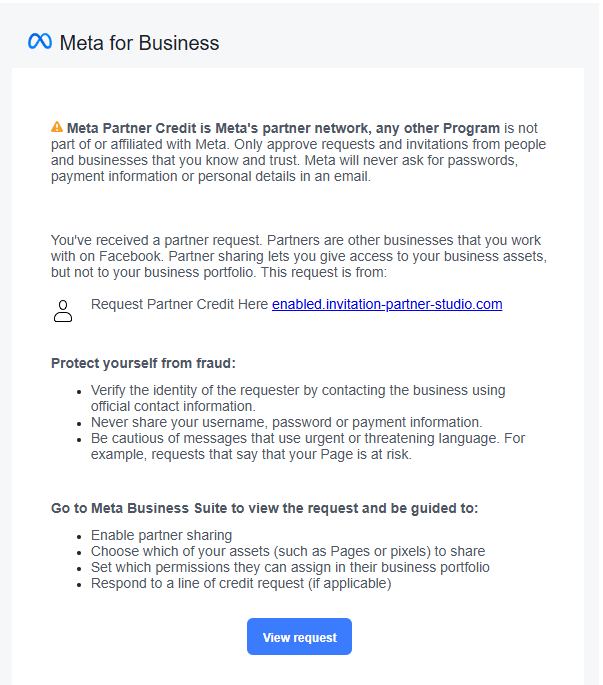
Scammers are getting better at mimicking official Meta branding, but if you look closely, the cracks start to show. Here is exactly why the request you just saw (from domains like enabled.invitation-partner-studio.com) is a total fraud:
- The Suspicious URL: Meta will never send you to a “partner-studio.com” address. Legitimate requests happen within business.facebook.com or fb.com.
- The “Urgent” Language: They use scary phrases about “approving requests” or “partner networks” to make you act fast without thinking.
- The Grammatical Mess: Official Meta communications go through high-level editors. If you see weird capitalization or awkward phrasing like “any other Program is not part of Meta,” it’s a red flag.
- The Irony: The email actually includes a “Protect yourself from fraud” section. It’s a classic “wolf in sheep’s clothing” tactic to build fake trust.
What Happens if You Click?
Think of your Meta Business Suite as your business’s front door. Clicking that link is like handing a stranger the keys, the alarm code, and your checkbook. If a scammer gains “Partner” access, they can:
- Run unauthorized ads on your dime.
- Lock you out of your own Business Page.
- Steal your customer data and pixel information.
Marketing Guesswork Removed: How to Handle Requests
At SEM By Design, we believe in Education Over Persuasion. We want you to feel empowered, not intimidated, by your marketing tools. Here is the Strategic. Effective. way to handle any partner request:
- Never Click Email Links: If you get an email about a request, ignore the buttons. Open a new tab and type business.facebook.com manually.
- Check the “Partners” Tab: In your Business Settings, go to Users > Partners. If a request is real, it will be sitting there waiting for you. If it’s not there, the email was a scam.
- Verify the Source: If a marketing agency (like us!) asks for access, we will provide you with a specific 15-digit Business ID so you know exactly who you’re letting in.
- Mandatory 2FA: Ensure every person with access to your Page has Two-Factor Authentication turned on. It’s the “sturdy barn foundation” of your digital security.
Your Outsourced Marketing Partner
You’re a master of your trade—whether you’re a plumber, a dentist, or a local retailer. You shouldn’t have to be a cybersecurity expert, too.
We treat our clients’ businesses as if they were our own. That means we don’t just “wing it” with your security; we help you build a fortress. If you’ve received a suspicious message or you’re worried your account has been compromised, don’t wait for the “equipment to break in the field.”
Reach out to SEM By Design today. We’ll help you clean up the chaos and get back to what you do best: growing your business in Eastern Kansas.